Link your game account to Twitch to start earning rewards!
Twitch Drops
June 14 - June 22 PT
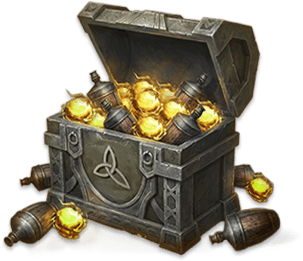
Hunter Supply Chest

Hunter Supply Chest

Watch stream for 15 mins to get

Healing Elixir x5

Gyldenblod x200
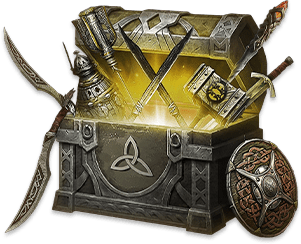
Excellent Weapon Selection Chest

Excellent Weapon Selection Chest

Watch stream for 30 mins to get

Open to select any Excellent weapon for any class
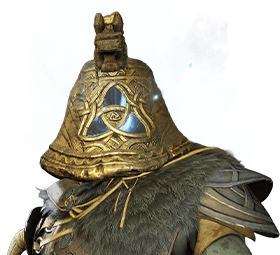
Returner Woodling - Head

Returner Woodling - Head

Watch stream for 60 min to get (limited to once per account)

After the game's official release, log in with the same account to receive all cosmetic rewards earned during this event via mail.

Twitch Drops Event FAQ
What are Twitch Drops?

Twitch Drops provide rewards to viewers watching specific streams on Twitch. Link your Twitch account and watch Drops-enabled streamers for specified durations to earn various items and rewards!

When and how can I participate?

Rewards are only available during the Twitch Drops event period. Check this page for the specific dates and current Drops. After successfully registering for Twitch Drops, watch any Drops-enabled Mistfall Hunter streamer's gameplay livestream for the specified durations during the event period to earn rewards. Streamers choose their own livestream times.

How do I claim my Twitch Drops rewards?

When you receive a reward, you'll get a notification on Twitch. You must claim the reward within 24 hours of receiving the notification to ensure you get the item. Once claimed, the item will be added to your account, and you can get the item by simply logging in. If you're already logged in, you'll need to log out and then log back in to get the item.

I didn't receive my reward(s)—who should I go to for help?

If you still haven't received your reward(s) 72 hours after claiming, please contact our team through ourofficial Discord.

How do I enable Twitch Drops for my stream?

All Mistfall Hunter streamers can enable Twitch Drops for their streams and provide rewards to their viewers. If you want to give your audience the opportunity to get these items, simply enable Drops in your Twitch account settings, set Mistfall Hunter as your streaming game, and go live during the event period.

Link Game Account
Link